
To assess whether an existing Laravel application can be migrated without issues to a new hosting environment, you need to carry out compatibility checks on APP_KEY integrity, external webhook connections, and environment variables. Ensure that all dependencies and configurations are consistent between the old and new environments to prevent operational disruptions.
Key considerations for Laravel hosting migration
When migrating a Laravel application to a new hosting environment, it is essential to ensure compatibility in order to keep integrations, jobs, authentication, and operational dependencies intact.
- Check the consistency of APP_KEY and encrypted data to prevent session and data loss.
- Ensure that external webhooks and API integrations continue to function correctly after migration.
- Validate environment variables and PHP extensions to avoid unexpected runtime errors.
- Perform a representative staging rehearsal to identify migration risks in advance.
- Implement a formal Go/No-Go and rollback plan for a controlled transition.
The importance of compatibility checks in Laravel migration
A Laravel hosting migration involves more than moving application files to another server. A live application also retains state: users are logged in, processes use configuration values, and data may be stored in encrypted form. The question is therefore not only whether the application displays a page after cutover, but whether the new environment provides the same conditions for processes already running in production. Compatibility checks make those conditions visible in advance and prevent an apparently technical move from only being assessed afterward based on its impact on business operations.
APP_KEY shows why this assessment is needed at the application level. Laravel uses this key for encryption. If the key is accidentally regenerated during a server migration, active user sessions immediately become invalid. This does not affect only access to the system at the time of transition; stored values encrypted using Eloquent's encrypted cast can subsequently cause irreversible DecryptException errors. A new hosting environment can therefore be accessible while parts of the existing data are no longer usable by the application.
For management and operational stakeholders, the assessment therefore shifts from “can this environment run Laravel?” to “does the existing application state remain intact?”. APP_KEY is not a replaceable installation setting that may simply be generated again. It belongs to the continuity of the existing application. A compatibility check incorporates these kinds of dependencies into the preparation, so they do not only emerge during or after cutover when users have to log in again or processes generate error messages.
The value of that preparation also lies in decision-making. If the existing key can be transferred in a controlled way and the consequences are documented, the transition can be assessed as a manageable change. If it is unclear which key is in use, which data it protects, or how the new environment handles it, there is a concrete continuity risk. In that case, postponement or further investigation is not a sign of delay, but the containment of a risk that would otherwise go directly into production.
Compatibility is therefore not a general quality claim about a hosting provider. It is about demonstrating that an existing Laravel application can retain its previously established state under changed hosting conditions. Particularly for encrypted data and active sessions, that demonstrability determines whether a technical move can also take place responsibly from an operational perspective.
Risks of missed checks during Laravel migration
For a live Laravel application, incoming webhooks are often part of a chain that starts outside its own hosting environment. An external party sends a message, the application receives it, and a business process can continue from there. After a hosting migration, that chain can break while the main application appears to function normally for employees and visitors. This makes missed checks risky: website availability is not proof that all operational dependencies still work.
A concrete risk arises when TLS certificate chains, reverse-proxy timeouts, or web application firewall rules are not configured identically in the new environment. Incoming webhooks from external partners may then fail silently after the migration. “Silently” is the issue here: an error does not necessarily become immediately visible in the normal user flow. The first indication may only arise when an expected follow-up action does not occur or when a partner reports that messages are not being processed.
For organisations with connected processes, this means that technical deviations can translate into an operational interruption. Not because the application necessarily fails completely, but because a separate entry point to the process no longer reaches the new environment. This distinction requires a broader assessment of the cutover. The question is not only whether the domain points to the new environment, but also whether external parties can still reach the application under the same connection conditions.
The risk increases when the migration is treated as a one-time infrastructure change without checking the routes through which external messages enter. TLS certificate chains, reverse-proxy timeouts, and firewall rules are all examples of environment settings that can affect webhook reception. If they do not match the earlier situation, the new environment may be technically online while an essential process step is missing.
Compatibility checks should therefore also answer which external messages enter the application and how their reception is confirmed after the transition. This is not a prescription for a particular hosting setup. It is a way to make a known migration risk visible before a silent error develops into a disruption in the business process.
Essential validation points for Laravel migration
Useful validation starts with a defined overview of what must match between the existing and proposed environments. PHP extensions and environment variables deserve a separate place in the inventory, alongside external IP dependencies. Not because every difference automatically causes an incident, but because these elements may form part of the Laravel application's actual execution context. Without a documented baseline, it is also impossible to determine which deviation needs to be explained after a transition.
Environment variables require two different checks: presence and handling. A variable may be functionally necessary, but it may also contain an application secret. The production environment should not be assessed based on the assumption that a newly created configuration is equivalent to the existing configuration. The relevant question is whether the intended production settings have been deliberately transferred, remain protected, and do not inadvertently result in an unwanted debugging mode.
The latter has a direct security and governance component. If debugging such as APP_DEBUG remains active in production, or if application secrets are managed incorrectly, database credentials and personal data may be exposed. This can result in violations of security guidelines and compliance standards. Validating environment variables is therefore not merely administrative work around deployment, but an explicit checkpoint for what the application exposes in production.
PHP extensions and external IP dependencies fit into the same assessment framework, but require their own records. For PHP extensions, this means determining which dependencies the existing application expects and which of them must be available in the new environment. For external IP dependencies, it means identifying relationships outside the application for which the current or new network situation is relevant. These points remain verifiable when they are listed as separate entries in the migration inventory, with an owner and a validation outcome.
Such an inventory distinguishes between three questions that are often conflated: does the application function correctly, is the production configuration set responsibly, and do dependencies outside the application remain identifiable? Answering these questions separately creates a better-supported point at which to decide on going live in production.
Checklist for Laravel migration validation
Use this checklist to ensure that all essential aspects of your Laravel application are validated before migrating to a new hosting environment. Each checkpoint is intended to prevent operational dependencies or configuration differences from only becoming visible after the transition.
- Inventory PHP extensions and environment variables. Request a documented audit that records all PHP extensions and environment variables used in the current environment. Explicitly compare this list with the new environment to prevent runtime differences or missing settings from causing unexpected errors. Pay particular attention to variables containing secret keys or external connections; these must be transferred in a controlled and secure manner.
- Check external IP dependencies. Identify which external systems, APIs, or services depend on specific IP addresses or firewall rules. This applies to both incoming and outgoing connections. Ensure that all required IP addresses are authorised by external parties in time and that firewall and network rules in the new environment match the current situation.
- Verify queue processing and mail handling. Test whether queue workers, the Supervisor daemon, Laravel Horizon, and Artisan scheduling function correctly in the new environment and perform the same tasks as in production. Also check whether email delivery works as expected, including authentication and relay settings. Record whether queue worker latency differs by less than 250 ms during the transition and who confirms the outcomes of these checks, so deviations can be identified and remedied immediately.
- Check the runtime process setup. Document how the PHP-FPM process manager, Redis Sentinel, and any OPcache preloading are configured in the current environment. Compare the relevant settings with the new environment so differences in process management, cache behaviour, or queue availability can be assessed before cutover.
Common mistakes in Laravel migration
A recurring mistake is treating production as the first full test environment. As a result, a deviation in a dependent process only comes to light once the transition is already affecting daily operations. A representative test migration turns that uncertainty into a verifiable situation in advance.
- Do not skip the end-to-end rehearsal. Set up a test migration in a representative staging environment using anonymised data and define in advance which chains will be run through. Do not only check whether a screen opens; also verify queue processing and mail handling using sandbox tools. This tests whether asynchronous processing and outgoing communication actually complete their full route in the intended migration situation. This is also the right time to investigate whether incoming dependencies behave as expected, including webhook routes that may be affected by TLS or environment deviations. The value of the rehearsal lies in the combination of representativeness and evidence: anonymised data keeps the exercise separate from production data, while the full process run makes visible which step does not align. A standalone technical installation check does not provide that evidence. When queue processing or mail is only reviewed after going live, a solvable preparation point becomes a potential disruption to the business process. Therefore, record for each test which flow was performed, what result is considered acceptable, and which deviations must first be resolved before the cutover is approved.
Practical application of validation points in Laravel migration
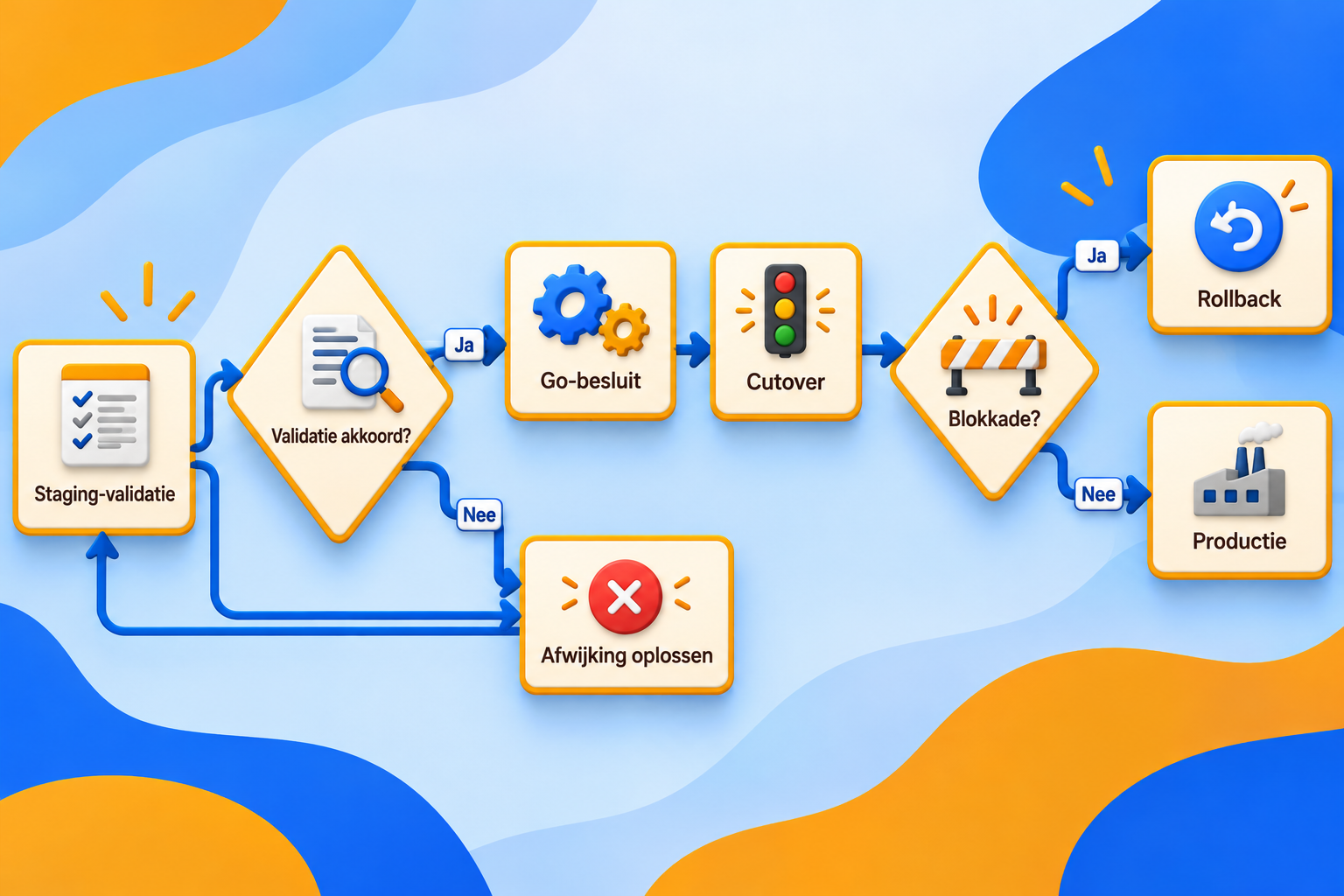
Validation points only gain governance value when they lead to an agreed decision about the production transition in advance. The application below connects the test environment to the cutover and describes what happens if a dependency blocks after the transition.
- Link the staging outcome to a formal Go/No-Go and rollback plan. Use the results from representative staging validation as input for explicit Go/No-Go decision points. The decision is then not based on the general impression that the new environment appears ready, but on documented results from the agreed validation points. In addition, document a rollback runbook before cutover for the scenario in which business-critical integrations unexpectedly block after the transition. This runbook includes clear recovery objectives, referred to as RTO and RPO, and a maximum cutover downtime of less than 15 minutes where that threshold has been agreed for the transition. Its function is not to rule out an incident, but to make clear in advance what recovery is being pursued when rollback proves necessary. These agreements also clarify responsibilities: who may make the Go or No-Go decision, who identifies that an integration is blocked, and under which documented conditions is the recovery route initiated? By determining this during preparation, a team does not first need to negotiate the direction of action during an incident. The staging environment thus provides the documented results on which the production decision rests. The rollback runbook forms the defined recovery route when those results no longer match reality after cutover.
Frequently asked questions about Laravel migration
When migrating a Laravel application to a new hosting environment, it is not sufficient for organisations with interconnected business processes that a partner merely demonstrates technical Laravel knowledge. B2B integration governance comprises the contractual agreements, technical controls, and allocation of responsibilities around connections between organisations. This scope is important because operational dependencies, such as API integrations and key management, directly affect the reliability of business processes after migration.
- Why is B2B integration governance important in Laravel migration? In a B2B context, integrations are not optional additions; they form the backbone of data exchange and process automation. A partner that demonstrably works methodically identifies these dependencies in advance and makes clear how API layers, network connections, and key management are scoped and controlled. This prevents critical integrations or security mechanisms from being unintentionally interrupted during the transition.
- How can a partner demonstrate control over the migration? Control is demonstrated through transparent documentation of dependencies, explicit agreements on secure key management practices, and making vulnerable transition points visible. A partner that can explain and substantiate these points gives your organisation concrete starting points for asking further questions about risks and responsibilities. It is not eliminating every deviation, but making vulnerable migration points recognisable and controllable that distinguishes a mature migration approach.
Key considerations for a successful Laravel migration
The transition to another hosting environment becomes manageable when preparation consists of demonstrable checks rather than assumptions about a new production environment. The following criteria clarify which evidence and boundary conditions should be available in advance.
- Assess the audit as the starting point. The pre-migration audit must provide a verifiable basis for what is being changed in production. A migration decision without a documented starting position does not sufficiently show which configuration and dependencies serve as the reference.
- Use the staging rehearsal for technical evidence. The test environment must run through the agreed chains, error scenarios, and acceptance criteria before going live in production is considered. The documented outcomes provide concrete input for the cutover decision rather than a general expectation that the migration will work.
- Formalise rollback and Go/No-Go. A rollback route and clear decision points define the response when the production transition does not proceed as expected. This is particularly relevant when an unexpected blockage in an integration affects business processes and thereby causes operational costs or delays.
- Include production settings in the final check. Before approval, explicitly verify that APP_DEBUG is disabled, error messages do not display sensitive configuration, and secrets are available only through the intended production configuration. This makes the final check a concrete detection step for unintended exposure, alongside functional validation of the application.
- Apply a clear release threshold. Going live in production is appropriate only when agreed validations have been documented, deviations have been explicitly assessed, and the recovery route is ready. If unexplained differences in production configuration or secret management remain, the potential exposure of personal data and recovery costs outweigh the speed of the move.
Take the next step in your Laravel migration
The next step in your Laravel migration requires a demonstrable preparation process, not an immediate production change. Document which production configuration will be transferred and how application secrets and debugging settings are configured in the new environment. An audit and a staging rehearsal provide a verifiable basis for assessing whether the transition can take place responsibly. This limits the risk that incorrect debug settings or improper secret management lead to the unintended exposure of database credentials or personal data, which is contrary to applicable security guidelines. Only documented checks and demonstrable test results allow a well-considered decision about going live in production.